I built this pipeline. I am not an attorney. That means I can tell you exactly what the AI is doing at each step, but I cannot tell you whether the output is sufficient to open a matter at your firm.
What I can walk you through is what comes out of each step, what decisions I made when building it, and where I know the output needs human review before anyone acts on it.
The scenario: rear-end collision, soft tissue injury, commercial truck involved, Texas. The client called, gave you notes, and you pasted them in.
Two steps, two different jobs
The pipeline runs two AI calls in sequence. They are doing different things and the output of each looks different.
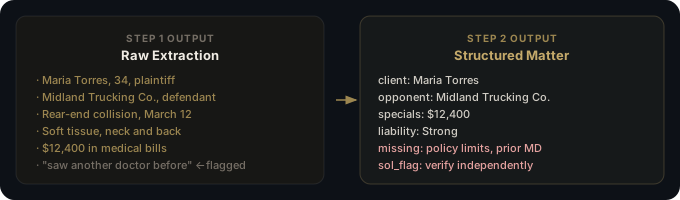
Step 1 extracts. Step 2 structures. Keeping them separate was a deliberate choice. If you combine extraction and structuring into one prompt, the model rushes the extraction to get to the formatting and misses edge cases. Splitting the calls costs one extra API call and is worth it every time.
What Step 1 produces
Step 1 reads your raw notes and pulls out every identifiable fact. The output is an unstructured list: names, dates, injury descriptions, documents mentioned, anything the client said that looks like it matters.
This step is intentionally broad. The prompt tells the model to surface everything, including things that seem minor. A client mentioning they "saw another doctor before" is easy to miss in a 10-minute intake call. The extraction catches it.
The most important instruction in the Step 1 prompt: do not infer facts not present in the notes. Without that line, the model fills gaps with plausible assumptions. A client who did not mention a police report should not come back with a police report listed as a known document. That constraint is what makes the output trustworthy.
What to verify from Step 1: read through the extracted facts against your actual notes. If the model surfaced something you did not write down, it invented it. That matters.
What Step 2 produces
Step 2 takes the extracted facts and maps them to a fixed schema. The output is structured JSON with named fields:
- Client and opponent: names, contact info, roles
- Practice area: what type of case this is
- Incident summary: what happened, when, where
- Injuries and treatment: what the client reported
- Special damages: medical specials, lost wages, anything quantified
- Liability assessment: a preliminary read on fault based on the notes
- SOL flag: whether a statute of limitations deadline was mentioned or calculable
- Missing info: everything required to open a full matter that was not in the notes
The schema is strict on purpose. If the output shape changes based on input, anything built on top of it breaks. The structured output is what lets you pipe it into a database, a matter management template, or the demand letter tool downstream.
The missing info flags
This is the most useful part of the output and the one most people overlook in the demo.
The pipeline checks what came out of Step 2 against a required-fields list for the practice area and returns everything absent as a flag. For a standard PI intake, the common flags are:
- Insurance policy limits (clients almost never volunteer this)
- Prior injuries or prior accidents (relevant for damages disputes)
- Exact treatment end date or whether treatment is ongoing
- Employer and wage documentation if lost wages are claimed
- Whether a police report was filed and the report number
These are not things the AI invented as missing. They are fields the intake schema expects that had no corresponding fact in the notes. The flag list becomes your follow-up checklist before you open the matter.
What the liability assessment is and is not
Step 2 includes a preliminary liability assessment based on the notes. For the rear-end collision scenario, it comes back as something like "strong liability, defendant clearly rear-ended client at a stop."
That assessment is based entirely on what the client told you. The client's account is one side of one phone call. The model does not know what the police report says, what the truck driver's insurer will argue, or whether there is dashcam footage that changes the picture.
Use the liability assessment as a documentation of the client's version of events, not as a conclusion. It is useful for case triage and initial strategy, not for drafting arguments.
The SOL flag
The pipeline flags the statute of limitations deadline if it can calculate it from the incident date and practice area. For a standard Texas PI case, it returns the two-year deadline.
Do not rely on this calculation without verifying it independently. Jurisdiction-specific exceptions (the discovery rule, minority tolling, claims against government entities) can change the deadline in ways the pipeline does not account for. The flag is a reminder to check, not an answer.
Where the pipeline breaks down
Multi-party cases. If three people were in the car or liability is split across defendants, the schema handles it poorly. It is built for a single client and a single primary opponent.
Legally complex facts. Products liability, comparative negligence where the client's account is clearly incomplete, cases with regulatory angles. The extraction still works but the liability assessment will be too thin to be useful.
Very short intake notes. If you give it two sentences, you get two sentences of extraction. The pipeline does not manufacture information. Short input produces a long missing info flag list, which is actually the correct behavior, but the structured output will have a lot of empty fields.
The client contradicts themselves. If the notes have conflicting information, the model will usually pick the more recent or more specific version without flagging the conflict. You will not know there was a contradiction unless you catch it yourself.
Try it
The demo below runs the full pipeline on the Torres v. Midland Trucking intake scenario. Watch it step through extraction and then structuring.
Or paste your own intake notes and run it on a real call:
The demand letter walkthrough covers what happens next: once you have structured matter data, how the demand letter tool uses it to produce a first draft.